Y’all, we’re really excited to be using Discord for better community and better game signups this year. We look forward to you coming along with us.
This page contains info on:
- Getting started with Discord
- To get access to 2025 channels
- How to sign up to play a game
- What about games not on the official schedule?
- Frequently Asked Questions
Why are we using Discord for game signups at MañanaCon?
Discord brings a lot of goodness to MañanaCon 2025:
- Direct communications between GMs and players
- Ability to discuss game sessions and other topics in advance of the convention
- Less shuffling through piles of sign-up sheets at the convention itself
- Less waiting on con staff to address your questions
Our previous system had reached its end point, with communication slowdowns, lack of transparency for GMs and attendees, confusion, and a large administrative overhead. Our old system was neither desirable for attendees nor feasible for volunteers as the convention is growing this year.
We evaluated several other game signup systems, and we’re confident that we can provide the best experience to you with Discord as our main tool for signups.
If you’re worried or curious about how it’s going to work, we get it. Read on! If you don’t want to use it, you can still come to the convention and have a great time by signing up for events and doing open play on the day-of (See the FAQ below).
We’re excited to roll this out for a better experience for you all!
Getting started with Discord
First things first: You need to join the MañanaCon discord.
There are a couple channels in the Discord that are open to anyone in the MañanaCon community, but we also have private channels for each convention year.
To get access to 2025 channels:
Change your server nickname to match the full badge name you registered under. (Go to “Edit per-server profile” and update your server nickname.)
Then, leave a ✅ emoji on this post so we know to add the 2025 attendee role to your profile. This process involves a human and may take 24-36 hours.
Once you’ve been added to the 2025 attendee role, you’ll be able to see some new channels:

When player sign-ups are open, you’ll see new forums as well:

How to sign up to play a game
Players can claim spots on a first-come, first-served basis.
Inside each forum, you’ll find a complete list of all scheduled events. Here’s a sample (with GM names redacted):

When you find a game you want to play:
- Click into the forum and post a message with your interest or any questions you have. You can also claim a spot for a friend on Discord–please say who the other player is.
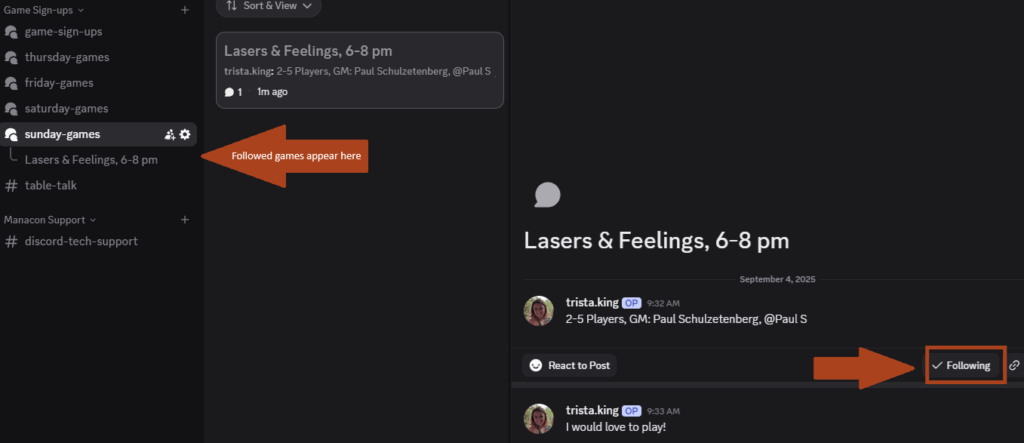
- Once you add a message to a forum post, you will be set as “following” that post and it will appear on the left navigation under the day it’s listed (as shown below).
- You can also opt in or out of “following” a post on the bottom right (with or without leaving a message).
- GMs and players can now freely talk to one another to figure out who will be playing and make any schedule adjustments as necessary ahead of and during the convention. There may also be discussion about the session in these forums — e.g. claiming player powers, adding/removing rules and expansions, and more.
What about games not on the official schedule?
Your game does not need to be on the official schedule.
You can set up an ad-hoc game at the convention by grabbing a “Looking for Players” sign. No Discord, just good old fashioned in-person coordination.
Option 1: I know when I want to schedule a game
- Using the “New Post” button to create a forum post in the appropriate day
- Use the standard format so that people know what to expect:
- [Game Name], [Time Slot]
- [# of players], GM: [Name], [GM discord handle]
- Add any tags as desired and appropriate
- Then in the form chat, you can optionally include additional information about the game, links, etc. to get people interested.
Option 2: I don’t know when I want to play, but I want to see if there’s interest in a game I want to host
- Navigate to the #looking-for-game-general-discussion channel.
- Start a thread or conversation there about what you want to play, providing as much information as possible for other players.
- Once you have enough players/interest and are ready to schedule your game, follow the steps in Option 1 (above) to add your game to the forum.
Frequently Asked Questions
What is my “full badge name”?
It’s the name you gave us when you signed up for the convention: your first and last name, in most cases. It does not need to match the name on the card you paid with. Please reach out to us if you’re confused or concerned about which name to use.
There’s a game I want to play scheduled at a time when I can’t attend. What can I do?
Let the GM know that you’re interested! If there is enough additional interest, GMs may opt to offer another session of the game at another time. Or if there are others with conflicts and it makes sense, the GM may opt to move the game to another time slot to better accommodate players.
I signed up for a game, but something has changed and I can no longer participate. What do I do?
Let the GM and other players know ASAP on the discord forum for that game. This will allow them time to find other players or let waitlisted players know that they have a spot.
I don’t want to pay for Nitro. Can I still use the MañanaCon Discord?
You don’t have to pay for Nitro! Discord makes this confusing, but if you go to your settings, then click “Edit per-server profile”, you should be able to change your name.
We don’t want to make anybody pay for Nitro, and we don’t want to impact your other servers.
I’m a GM and I’m not sure what to do with my Discord thread.
- Talk to your players directly in the thread. It’s great to discuss things like length of session, expansions, available playbooks–really whatever you might want to know to make your session work.
- Create a list of players in the post. That makes it super clear who you expect to be there at game time.
- If your game is FULL (aka no more room for players), you can confirm the players who made it (we go by a first-come, first-served policy) and let the others know they are on a waiting list.
- You can use this thread to communicate with players the day of your game. If someone you expected isn’t there, you can ping them — or if you’re short a player, you can always let the waitlist folks know there is new space in your game.
Here’s an example of how it might look:

I’m a GM, and there aren’t enough players at the currently scheduled time, but there is interest at another time. What should I do?
Feel free to change the time of your game in the Forum and communicate directly with players to verify the new day/time. We find that people directly self organizing have the most success at getting the right people together and maximizing the enjoyment.
What about people who don’t want to use Discord?
We hope you’ll give it a chance! That said, if you don’t want to use Discord, you can wait until the convention and find games to play the good old fashioned way. We’ll have looking for players signs, and you can always find the GM in person to chat about whether or not they have space in their game.